
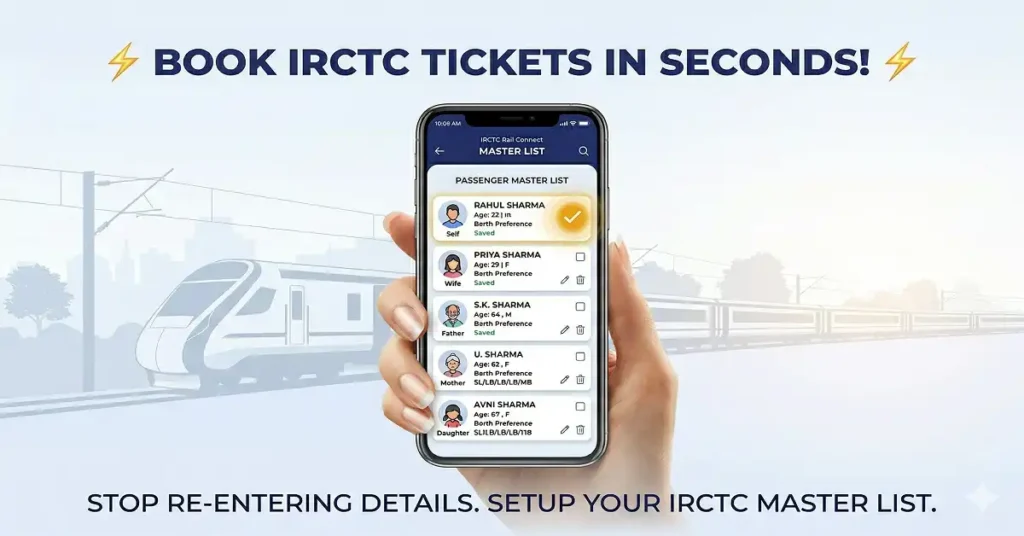
Booking train tickets on IRCTC Rail Connect App can sometimes feel slow and repetitive—especially when you have to enter passenger details again and again.
If you’re someone who travels frequently or books tickets for family members, there’s one feature that can save you a lot of time:
👉 Master List in IRCTC.
In this guide, you’ll learn everything about the Master List—what it is, how it works, how to create it, and why you should start using it today.
What is Master List in IRCTC?
The Master List is a feature in IRCTC that allows you to save passenger details in advance.
Instead of entering passenger information every time you book a ticket, you can simply select saved passengers from the Master List.
👉 In simple words:
Master List = Saved passenger details for quick booking.
Why IRCTC Master List is Important?
Let’s be real—typing details like name, age, ID, and berth preference every time is:
- Time-consuming
- Repetitive
- Prone to mistakes
That’s where the Master List becomes super useful.
Key Benefits of IRCTC Master List
- ✅ Saves time during booking
- ✅ Reduces typing errors
- ✅ Makes booking faster
- ✅ Perfect for family travelers
- ✅ Useful during Tatkal booking (where speed matters)
How IRCTC Master List Works?
The process is very simple:
- You add passenger details once
- IRCTC saves them in your account
- During booking, you select passengers from the list
- Details are automatically filled
👉 No need to type again and again.
Who Should Use IRCTC Master List?
This feature is especially useful for:
- People who travel frequently
- Families booking tickets together
- Students traveling home regularly
- Office workers with frequent travel
- Anyone using Tatkal booking
👉 If you book tickets even 2 times a month, this feature is a must.
What Details Can You Save in Master List in IRCTC?
Here’s what you can store:
| Field | Description |
|---|---|
| Name | Passenger full name |
| Age | Passenger age |
| Gender | Male/Female/Other |
| Berth Preference | Lower, Upper, Side Lower, etc. |
| ID Card Type | Aadhaar, PAN, Passport, etc. |
| ID Number | Valid ID proof number |
| Senior Citizen | Yes/No |
How to Create Master List in IRCTC?
Follow these simple steps:
On IRCTC Website
- Go to IRCTC official website
- Login to your account
- Click on “My Profile”
- Select “Master List”
- Click on “Add Passenger”
- Enter all details
- Click Save
On IRCTC App
- Open IRCTC Rail Connect App
- Login
- Go to My Account
- Tap Master List
- Click Add Passenger
- Fill details
- Save
How to Use Master List While Booking Ticket?
This is where the magic happens.
🧾 During Booking
- Search train
- Select train and class
- Go to passenger details page
- Click “Add from Master List”
- Select passengers
- Details auto-fill instantly
👉 Booking becomes 2x faster.
Master List in Tatkal Booking
Tatkal tickets sell out in seconds.
If you manually enter details:
- ❌ You lose time
- ❌ Tickets get booked by others
With Master List:
- ✅ Select passengers instantly
- ✅ Complete booking faster
- ✅ Higher chance of getting confirmed ticket
👉 Pro Tip: Always create Master List before Tatkal booking.
Master List vs Manual Entry
| Feature | Master List | Manual Entry |
|---|---|---|
| Speed | Very Fast ⚡ | Slow ⏳ |
| Effort | Minimal | High |
| Error Chances | Low | High |
| Best Use | Frequent booking | Rare booking |
Maximum Passengers Allowed in IRCTC Master List
- You can save up to 20 passengers in your Master List
- You can edit or delete them anytime
👉 Enough for most families and regular travelers.
How to Edit or Delete Passengers in IRCTC Master List?
🔄 To Edit
- Go to Master List
- Select passenger
- Click Edit
- Update details
- Save
❌ To Delete
- Open Master List
- Select passenger
- Click Delete
👉 Keep your list updated to avoid issues.
Important Things to Remember
Before using Master List, keep these points in mind:
- Always enter correct name and age
- ID details should be accurate
- Carry the same ID during travel
- Double-check before booking
- Update details if anything changes
Common Mistakes to Avoid
Avoid these mistakes:
- ❌ Wrong spelling of name
- ❌ Incorrect age
- ❌ Using invalid ID number
- ❌ Not updating expired ID
- ❌ Selecting wrong passenger
👉 These can lead to problems during ticket checking.
Real-Life Example
Let’s say you travel with:
- Your father
- Your mother
- Your sister
Without Master List: 👉 You type details every time
With Master List: 👉 Just select all three in one click.
👉 IRCTC Master List Saves time + reduces stress.
Is IRCTC Master List Safe?
Yes, it is completely safe because:
- It is part of your IRCTC account
- Data is stored securely
- Only you can access it after login
👉 Still, don’t share your login details with anyone.
Smart Tips for Using Master List
Here are some practical tips:
- Add all frequent travelers in advance
- Double-check ID numbers
- Use correct berth preference
- Create list before peak travel seasons
- Use it for Tatkal booking
Final Thoughts
If you are still typing passenger details every time while booking tickets, you are making your life harder than it needs to be.
👉 The Master List in IRCTC is one of the simplest yet most powerful features for faster booking.
🔥 Key Takeaways:
- Save passenger details once
- Use them anytime during booking
- Reduce errors and save time
- Best for frequent travelers
- Must-have for Tatkal booking
If you book train tickets regularly, start using Master List today—you’ll never go back to manual entry again.

When I try to save additional name in master list or try to correct already enter name it says ‘This time it is now allowed’ Why?